Your cookie choices
We use essential cookies to run the site. With your consent, we also use analytics cookies (Google Analytics, Microsoft Clarity) and support-chat cookies (Tawk.to) to improve your experience.
The route editor made for riders.
Build routes from scratch on the map or combine Google Maps, GPX files and MotoTrips Go recordings. Drag points, merge and split stages, analyse elevation and export — all in the browser, nothing to install.
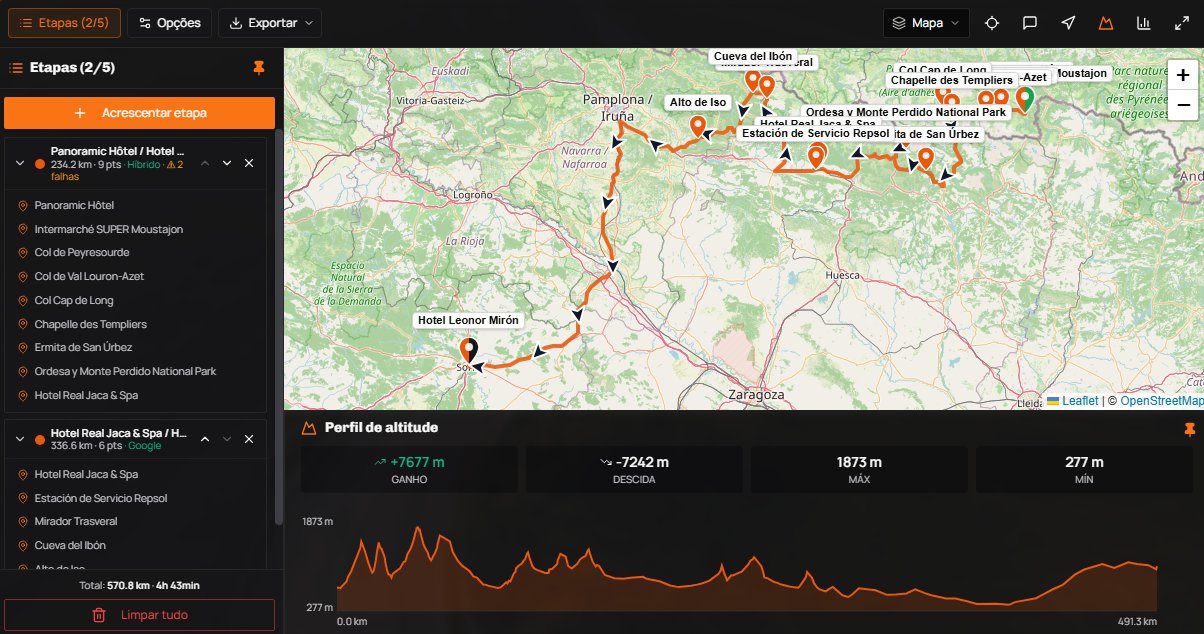
Create, edit, analyse, export.
Not just another GPX converter. A visual editor built for how riders really plan trips — point dragging, informative layers, road-snapped elevation and editing of the routes you already saved.
Import from multiple sources
Paste Google Maps URLs, drop GPX files (multi-track) or pull routes recorded with MotoTrips Go. Everything shows up as independent stages in the same route.
Edit saved routes
Open routes from Route Management or from a trip and edit them straight in the editor — changes flow back to where they came from, no duplicates.
Drag points and endpoints
Move any point or a stage's endpoints on the map; the path recalculates automatically, with confirmation before applying.
Merge, split and reorder
Join adjacent stages, split with an interactive slider (up to 9 draggable points) and reorder by dragging — distance and duration add up on their own.
Rename and sync points
Name start, end and junction points. Renaming a shared junction automatically syncs both connected stages.
Elevation + POI layers
Elevation profile aligned with the route's real distance, with cumulative gain/loss. Informative point-of-interest layers (fuel, viewpoints…) along the way.
Photos on points
Attach photos to route points to document stops, viewpoints and places of interest.
Export + route options
Export a single GPX, a ZIP per stage or Google Maps URLs. Toggle to avoid motorways and tolls on calculated stages.
From the first stage to the final GPX in 4 steps.
The editor adapts to your flow. Import from anywhere, split where you need, export wherever you want.
Start fresh or import
Build the route right on the map, paste a Google Maps URL, drop a GPX or pick a route recorded with Go.
Edit on the map
Drag points and endpoints, merge/split/reorder stages and rename points. If there are gaps between stages, you'll see a clear warning to fix it.
Enrich and analyse
Turn on point-of-interest layers, the elevation profile and add photos to points. Adjust options (motorways/tolls) and reapply.
Export or save
Export GPX or Google Maps URLs, or save straight to Route Management / a trip. All with named stops and the real path.
Fits your workflow
The Route Editor doesn't live in isolation: import routes from the Go app (Route Management), refine them here and send them back to Route Management — synced to your phone or ready to become a trip.
Detailed guide for each operation
10 Help Center articles cover everything from importing a stage to resolving gaps between stages, with screenshots and examples.
Per-session limits
Up to 7 stages at once in the editor (5 on free plans). For very long routes, merge first and export in parts — then re-import when needed.
Ready to draw your next route?
The editor opens in your browser with no installs or extensions. Your files stay on your device until you decide to export.